DLLM Desktop: a local chat UI for your applications
DLLM Desktop is an Electron desktop shell for running and managing DLLM-compatible applications on your computer. It gives your applications a shared conversational interface, with views for dashboards, logs, and prompts. Your application implements the commands, responses, and automation behaviour; Desktop provides the interface and manages the local environment.
DLLM is for individual builders and staff with developer skills who want to build personal workflow automations using a reusable chat UI and Python application structure. Desktop currently supports one user in desktop mode.
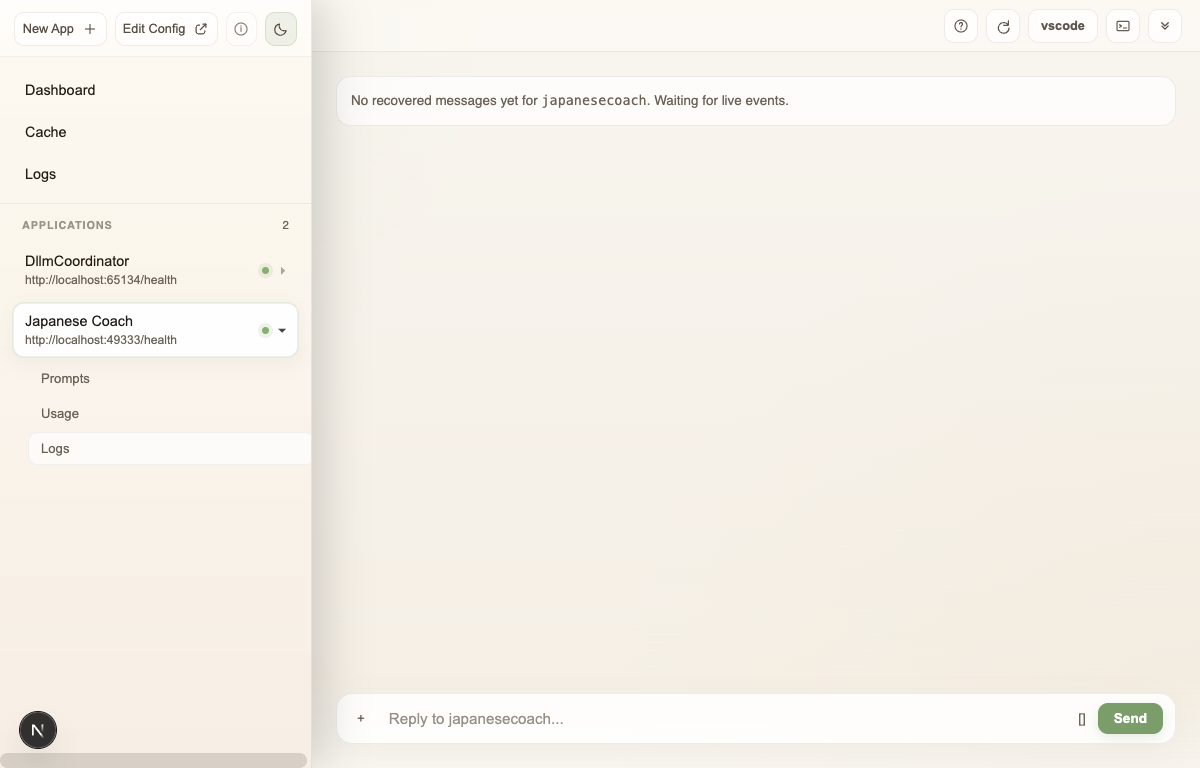
Start with your first application
Install DLLM Desktop using the Codex setup skill or the manual installation instructions. Once Desktop is running, follow Getting Started: create Japanese Coach. The walkthrough creates an application from ChatTemplate, adds a server-time command with Codex, and makes the change available in Desktop after you review, commit, push, and restart it.
The result is a running application and a development cycle you can repeat for your own workflow. You can continue editing its repository with your preferred external coding agent.
What does DLLM Desktop manage?
- A shared chat interface. Select a registered application and send it messages or commands. The application determines how to respond.
- Application creation. Use New App+ with
chattemplateand your own Git repository to create a compatible starting application. - A local workspace. Store profiles, application registrations,
repositories, and logs under
~/.dllmapp. - Application lifecycle. Desktop periodically launches App Hub to keep registered applications up to date and running.
- Supporting services. First-run setup configures the local Docker-based stack: Redis for storage; Redis Exporter and Prometheus for metrics; Loki and Promtail for logs; and Grafana for dashboards.
Desktop and App Hub manage DLLM-compatible applications. The intelligence and workflow logic live in those applications. Applications that call an LLM use the API keys and provider services required by their implementation; running Desktop locally does not mean those model calls run on your computer.
How the DLLM components fit together
| Component | Responsibility | Learn more |
|---|---|---|
| DLLM Desktop | The desktop chat UI, local environment, and shared dashboard, log, and prompt views. | Desktop source |
| App Hub | The bootloader that updates and starts registered applications and launches the local Profiles HTTP server. | App Hub source |
dronelabour-dllm | The Python application base, file-based prompt management, and LLM API helpers. | Python API reference |
chattemplate | The minimal DLLM-compatible application used by New App+ as a starting point. | ChatTemplate documentation |
You start with ChatTemplate, implement your application's behaviour in Python, and use Desktop to interact with it. App Hub manages the registered application's lifecycle. The library provides the application base and LLM helpers where your implementation needs them.
How application changes reach Desktop
- Create a compatible application with New App+ and its own repository.
- Open the project in your coding tool and implement a command or feature.
- Review the change, commit it, and push it to the application's repository.
- Restart the application in Desktop to load the pushed version, then try the command in chat.
An edit in your coding workspace is not yet a change to the running application. The Getting Started walkthrough shows both the expected failure before publishing a command and its successful response after restart. To give your coding agent DLLM implementation context, connect it to the documentation MCP server.
Workspace and profile reference
The following sections describe the files and settings behind managed applications. For your first application, use the walkthrough above before editing registration files directly.
Workspace layout
DLLM Desktop works with a local workspace in ~/.dllmapp. If the folder does
not already exist, Desktop creates it automatically. The workspace stores user
data, profiles, application registrations, source repositories, and application
logs.
By default, Desktop creates the profilename profile. Its important folders and
files include:
~/.dllmapp/
├── user_profile.json
└── profiles/
    └── profilename/
        ├── appinfo.json
        ├── boot-*.json
        ├── repositories/
        └── docker/
            └── logs/
| Path | Purpose |
|---|---|
~/.dllmapp | The root of the local workspace. |
~/.dllmapp/user_profile.json | Stores user data. |
~/.dllmapp/profiles | The root folder for local profiles. |
~/.dllmapp/profiles/profilename | The default profile folder. |
~/.dllmapp/profiles/profilename/appinfo.json | Application data generated by the profile bootloader. |
~/.dllmapp/profiles/profilename/boot-*.json | Registration files for managed applications. |
~/.dllmapp/profiles/profilename/repositories | Source repositories for managed applications. |
~/.dllmapp/profiles/profilename/docker/logs | Logs for all managed applications. |
Select a profile
Set DLLM_PROFILE_NAME to load a profile other than the default:
export DLLM_PROFILE_NAME=profilename
Use the profile name that matches the folder under ~/.dllmapp/profiles.
Managed applications
Managed applications are configured in the profile's boot-*.json files.
Desktop loads every configuration file that matches this pattern and merges the
configuration before running the profile bootloader.
The initial setup includes a boot.json template. When adding an application,
create a new boot-*.json file and add its registration to the
applications array. Keeping application registrations in separate files
makes each application easier to manage independently.
Configuration example
{
  "apptemplates": {
    "__EXAMPLE__": {
      "url": ""
    },
    "chattemplate": {
      "url": "[email protected]:dronelabourlm/chatapptemplate.git",
      "branch": "v0.1"
    }
  },
  "applications": [
    {
      "name": "__EXAMPLE__",
      "enabled": true,
      "gitrepository": "[email protected]:projectgroup/project.git",
      "gitbranch": "main",
      "launcher": "conda",
      "launcher_command": "python",
      "launcher_args": [
        "-m",
        "mainmodule"
      ],
      "env": {
        "OPENAI_API_KEY": "",
        "GOOGLE_API_KEY": "",
        "USER_PROFILE_FILE": ""
      }
    }
  ]
}
The apptemplates object defines available application templates. The
chattemplate entry points to the chattemplate repository and its v0.1
branch.
Each object in applications registers one managed application. It specifies
the repository and branch to use, how to launch the application, and any
environment variables required at runtime. Entries named __EXAMPLE__ are
placeholders to replace with your own application details.
| Field | Purpose |
|---|---|
enabled | Controls whether the bootloader starts the application. |
gitrepository and gitbranch | Identify the application source repository and branch. |
launcher | Selects the application launcher. The currently supported value is conda. |
launcher_command | Selects the application command. The currently supported value is python. |
launcher_args | Define the arguments passed to the command. |
env | Supplies environment variables to the application process. |
chattemplate uses the supported conda launcher with a Python command.
How the bootloader manages applications
Desktop runs the profile bootloader periodically. On each cycle, it reads the
merged boot-*.json configuration, starts applications whose enabled value
is true, and checks their repositories for updates with git pull. When an
application has updated source, the bootloader restarts it.
The bootloader then creates appinfo.json. DLLM Desktop reads this file to load
information about the managed applications.
Local backend
App Hub launches the Python DLLM Profiles HTTP server during its lifecycle
cycle. The server listens on port 26001 by default and provides the backend
that Desktop uses to communicate with profiles and applications.
The server source is part of App Hub.
Continue building
- Create your first application with the Japanese Coach walkthrough.
- Explore ChatTemplate to understand the application you will extend.
- Read the Python API reference for LLM calls and prompt configuration.
- Connect your coding agent to the documentation for implementation context.